Are you feeling overwhelmed or daunted by finding federal grants, keeping track of complicated applications, or determining which grant programs are right for your nonprofit? In this article we’ll go over what federal government grants are, why they’re important, and how to find federal government grants fast.

TOPIC
AUDIENCE
Navigating the maze of federal government grants can be daunting. However, once you understand how the system works, federal grants become a powerful tool for funding.
In this blog post, we will demystify the process of locating and applying for these grants.
You’ll learn:
.png)
Federal government grants are monetary funds allocated by various federal agencies. They play a crucial role in enabling organizations to perform their essential work effectively.

Here's what you need to know about federal grants:
Remember, finding and applying for federal government grants can be a detailed and intensive process. However, the financial support and stability they offer merit the effort.
Related: Check out our Free Grant 101 class with Patrice Davis, a grant professional with 15 years of experience applying for federal grants. In her 60-minute class, she unpacks the 5 Steps to Get Government Grant Ready.
Many nonprofits pursue federal government grants because they offer sizable awards. For that reason, these opportunities make up a large portion of their yearly fundraising.
They are a key component of many nonprofits’ funding strategies for several reasons:
If your nonprofit operates in a domain that aligns with federal funding interests such as health, social services, or the arts, it's worth considering applying for federal government grants.
These grants are often favorably awarded to large and mid-sized nonprofits working on scalable projects and serving large constituent groups.
Have you ever considered using Instrumentl to find federal grants for your nonprofit?
Many dread navigating Grants.gov and other government databases because it can be such a headache.
But Instrumentl is better for finding grants than federal databases.
Instrumentl focuses on matching your nonprofit with only the best-fit opportunities, ensuring you aren't overwhelmed with a multitude of potentially irrelevant grants, as is often the case with government databases.
In short, Instrumentl saves you time.
To start finding grants from the federal government, here’s how you do it.
This section will guide you through a step-by-step process of finding grants using Instrumentl.
Step 1: Set Up Your Nonprofit Within Instrumentl
After you’ve signed into Instrumentl, you’ll start creating a new project. You’ll have three steps to complete:
You will start by entering your organization’s information.
In the “1. Organization” section, you’ll fill in details on your nonprofit, such as your location and fiscal year. This will help filter out grants that aren’t relevant to the area you serve.

In the next section, “2. Overview,” you’ll create a project.
Think of a project on Instrumentl as similar to a "saved search." A Matches & Tracking project provides you with funding opportunity matches and a tracker.

In the last section, “3. Matches Setup. ”

You’ll specify:

Then select your location based on your state and the counties you serve.

In our example, let’s say we operate out of Michigan, specifically the counties surrounding Detroit. Simply search your state, and then select the counties relevant to you.

Now, select the field of work you operate in. This will ensure you get matched with grants from federal funders who support nonprofits that do the work you do.

It’s best practice to select 2-3 fields of work so you have a wide enough scope for relevant grants.
When clicking, “+ Select Field of Work,” search for the cause you support, in this case food security, and select 2-3 keywords from the drop-down that fit your mission.

In our example, we’ll select 3 fields of work related to food access and hunger.
Next, set a minimum or maximum type of grant you’d like to be matched with. This will filter out grants that are either too small, making them not worth pursuing, or too large, making them too competitive.
In our example, I’ll set my minimum to $1,000 and no maximum. I’ll take all the funding I can get!

Once you have completed filling out all the necessary fields, make sure to click on the "Save and Exit" button.
Invite your team members who will help manage your grants within Instrumentl.
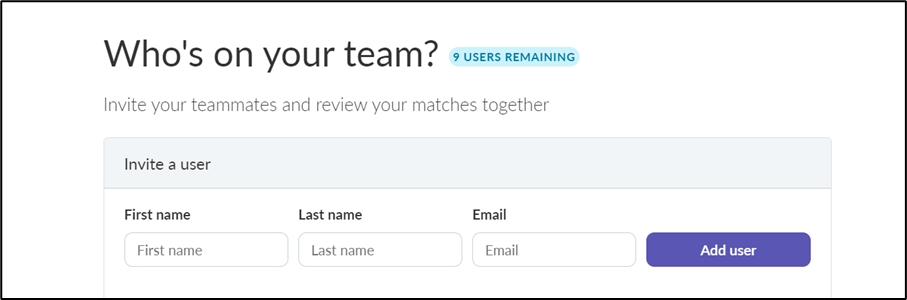
Once you have finished following these steps, we will display all the top grant matches for you.

Step 2: Narrow Your Grant Search To Only Federal Government Grants
When you first start reviewing your matches, you’ll notice that Instrumentl resembles an email inbox. The matches are on the left, and when you click on one, the details will show on the right.
The left side shows all your matches:

Use the filters to select "Federal Government" under the “Filter” dropdown tab.

As a result, you'll see only federal government grants. Additionally, you can filter by geographic region, funding amount, and more.

Step 3: Prioritize Your Grant Opportunities
Once you have a list of the most suitable federal grant opportunities for your nonprofit, you can review each one in detail.
Clicking on the profile of each opportunity will allow you to examine the "FUNDER OPPORTUNITY" and "FUNDER" tabs.

These sections contain essential information that will help you evaluate whether a grant aligns with your nonprofit's goals and objectives.
The "FUNDER OPPORTUNITY" tab provides key information about the grant, including focus area, support type, and priority funding areas.
After thoroughly reviewing the grant matches, it's important to save the ones that interest you.
By doing this, you can easily revisit the grants later on in your Grant Tracker and keep track of which ones you have decided to pursue with a letter of intent or a full proposal.
To save your grants, you can add a note about why you’re saving the grant and click on the red "save" button located at the bottom of the screen.

This will help you stay organized and focused on the grants that are most relevant to your needs.
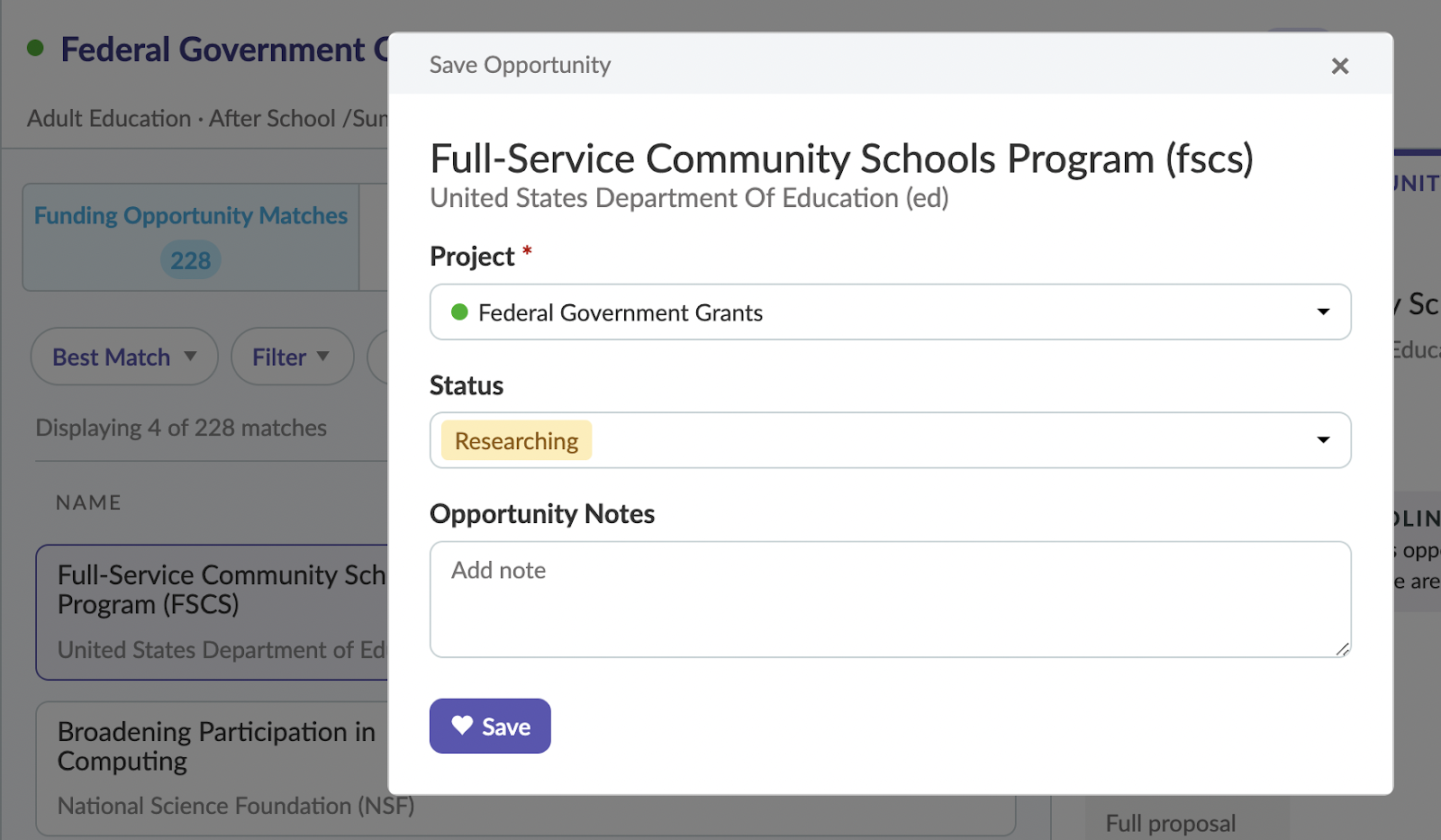
Once you click on it, a pop-up window will appear where you can write any notes about the grant that you would like to revisit later.
Instrumentl allows you to organize your saved grants by marking them as "Researching." This feature helps to segment your grant opportunities according to your progress.

Step 5: Store Saved Grants In Your Tracker For Future Reference
The Instrumentl Grant Tracker serves as a reliable and efficient tool for managing your pool of saved grants.
The Grant Tracker functions as a personal database for your prospective federal grants, keeping all your selected opportunities in one place for easy access and organization.

Moreover, the Tracker allows you to update and monitor the status of your grant applications.
Each grant saved in your Tracker can have its status updated as you progress through the application process.
To change a grant's status, simply click on the grant within your Tracker.

You'll find a "Status" dropdown where you can select the appropriate status for your grant. You can choose from various status options, including "Researching," "Planned," and "Submitted."

This feature allows you to have real-time updates on your tasks and helps you efficiently manage your application processes.
With Instrumentl Tracker, navigating the world of private grants for nonprofits becomes a more streamlined and organized endeavor.
FAQ on Federal Government Grants
Federal government grants represent a significant avenue of financing for your nonprofit. Yet, just as with any funding source, navigating the landscape of federal grants can seem daunting.
Billions of dollars are allocated annually in federal government grants for nonprofits. With the right approach, your organization could be a beneficiary too.
Below, we answer the common questions surrounding federal grants to equip your nonprofit with the essential knowledge required to successfully secure funding.
The answer to this is always YES. There are always open grant opportunities from the federal government, although not in every focus area.
Check regularly to see if there are new opportunities that are a good fit for your nonprofit.
Yes. The federal government is required to publish information on federal spending, including grants. Nonprofits that receive government grants are required to publicly disclose (on your 990) the amount of any federal grants.
The main kinds of federal government grants are:
Federal grants are typically very competitive. Most nonprofits have a less than 50% chance of being awarded a federal grant.
If a grant opportunity is closely aligned with your project or program, it is still worth applying. Keep in mind, Instrumentl can help you find funders that align well with your project or program.
The cons to federal government grants are that they’re highly competitive and have involved application processes and stringent reporting requirements.
The pros are that they are often larger than foundation grants, can lead to multi-year funding, and lend prestige and credibility to your organization.
Finding federal grants for your nonprofit starts with understanding your organization's mission and how it aligns with federal initiatives. A good starting point is to explore theGrants.Gov website, which houses information about thousands of grant opportunities.
Moreover, leveraging platforms like Instrumentl can simplify your search, as it aggregates grant opportunities from various sources and provides personalized recommendations based on your nonprofit's profile.
Writing a successful grant application requires a deep understanding of your nonprofit's mission and goals, clear and concise writing skills, and a strong knowledge of the grant's requirements and objectives.
Several resources can help you with this process, including "Tips for Stronger Grant Proposals" and "The Best Grant Writing Exercises to Improve Your Grants."
Wrapping Up: How to Find Federal Government Grants Fast
Securing federal government grants for nonprofits may seem like a daunting task, given the competitive nature and the involved application process. However, having the right tools and resources at your disposal can significantly streamline the process.
Instrumentl, with its robust grant search and tracking features, serves as your ultimate navigator in the realm of federal grants.
Remember, persistence is key in grant-seeking. With a thorough understanding of your organization's mission and how it aligns with federal initiatives, you stand a better chance at securing desired funding. Let's make the world a better place together, one grant at a time.
Federal government grants are financial awards provided by the U.S. federal government to support projects and programs that benefit the public. They do not have to be repaid if the recipient adheres to the grant's terms and conditions.
You can find federal government grants through online databases such as Grants.gov, where you can search for opportunities by category, eligibility, and agency. Other resources include the websites of specific federal agencies and professional grant-finding tools.
Eligibility for federal grants varies based on the specific program. Common eligible applicants include non-profits, educational institutions, small businesses, and state or local governments. Always review the eligibility criteria for each grant opportunity.
The process typically involves registering on Grants.gov, identifying applicable funding opportunities, preparing a proposal or application, and submitting the necessary documentation through the specified platform by the deadline.
To improve your chances, focus on understanding the grant requirements, tailoring your proposal to align with the funder's goals, providing detailed budgets and plans, and submitting applications before the deadline. Seeking professional grant-writing assistance can also be beneficial.
Table of contents

